
BROTHER PR1X
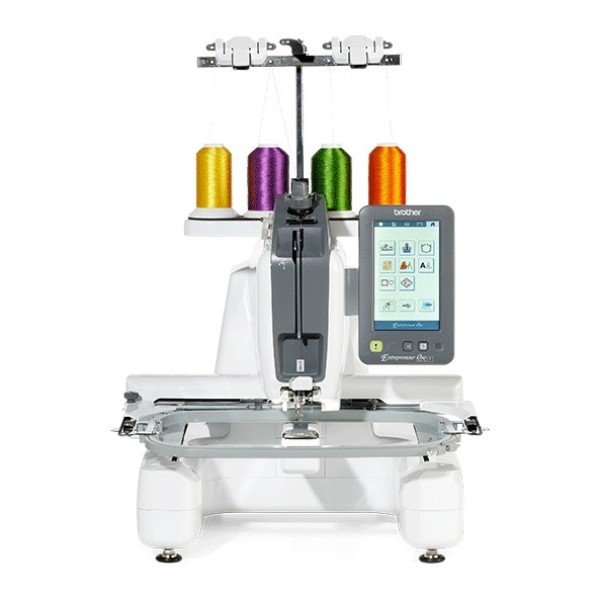
A semi-professional single-needle embroidery machine for small businesses, called PR1 on the Brother Europe website. The embroidery area is 300 × 200 mm and the speed is up to 1000 stitches/min.
In the Brother operation manual (882T52) and on the US website the machine is called PR1X, while the Brother Europe website, leaflet and videos call it PR1 or Entrepreneur PR1. It is the same machine. It is for embroidery only.
The embroidery area is 300 × 200 mm, so a large design can be embroidered without repositioning the fabric in the hoop. The machine has 495 designs and 33 fonts, which you can preview and edit on the 7-inch touchscreen.
The laser crosshair shows where the needle will drop. The bobbin can be wound while embroidering, and the thread is cut automatically at the end of each colour. The machine has a stand for 4 spools of thread.
Features
Large embroidery area
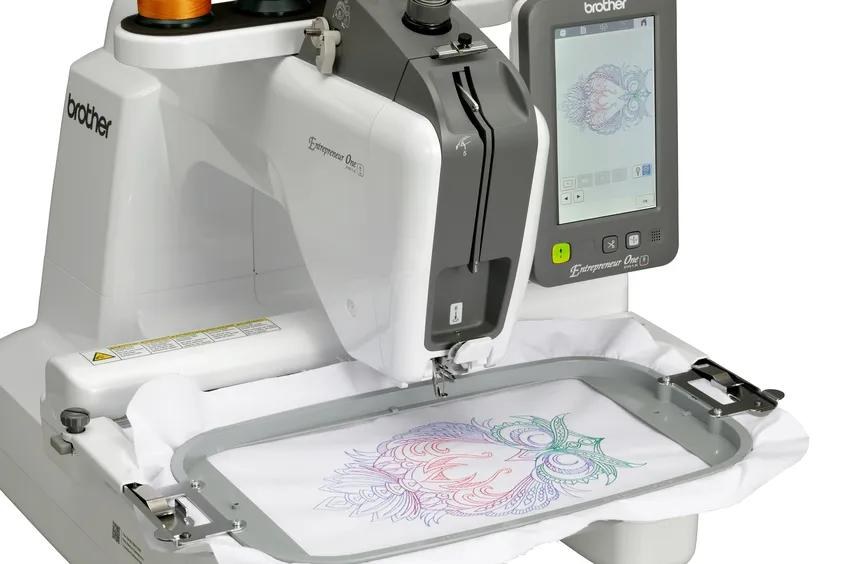
The maximum embroidery area is 300 × 200 mm. Two hoops are included: 300 × 200 mm and 100 × 100 mm.
The maximum speed is 1000 stitches/min., but it depends on the hoop. A lower speed is recommended for thin, thick and heavy fabrics, and with a weak thread such as metallic thread you should set 400 stitches/min.
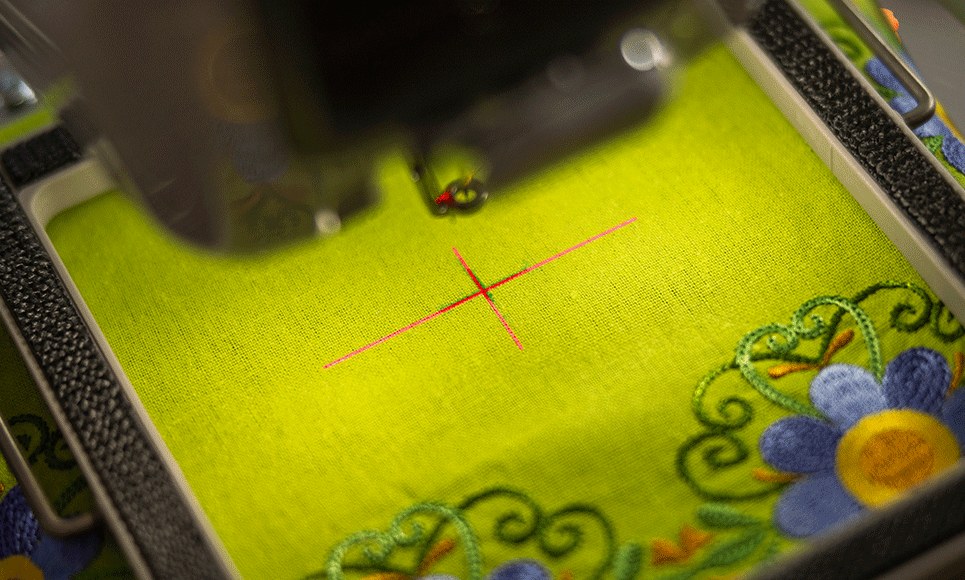
Laser crosshair and two-point positioning
The laser crosshair shows where the needle will drop. Its brightness can be adjusted on the screen, and before embroidering you can check where the design will land on the fabric.
For two-point positioning, mark the desired position on the fabric with a chalk pencil and draw the reference direction as a longer line. On the screen, select the reference direction and the point, then use the positioning keys to move the hoop until the laser crosshair meets the centre of the mark, and then until it is aligned with the mark in the reference direction. The design is aligned to that direction.
Besides the laser, you can check the design position with the trial function, which moves the hoop along the outer edge of the design. On the screen you can set the needle starting position and move the hoop in 0.1 or 0.5 mm steps.
With some hoops the laser cannot be used. When embroidering on uneven or rough fabric and when using the cap frame, check before you start that the laser point matches the needle drop point.
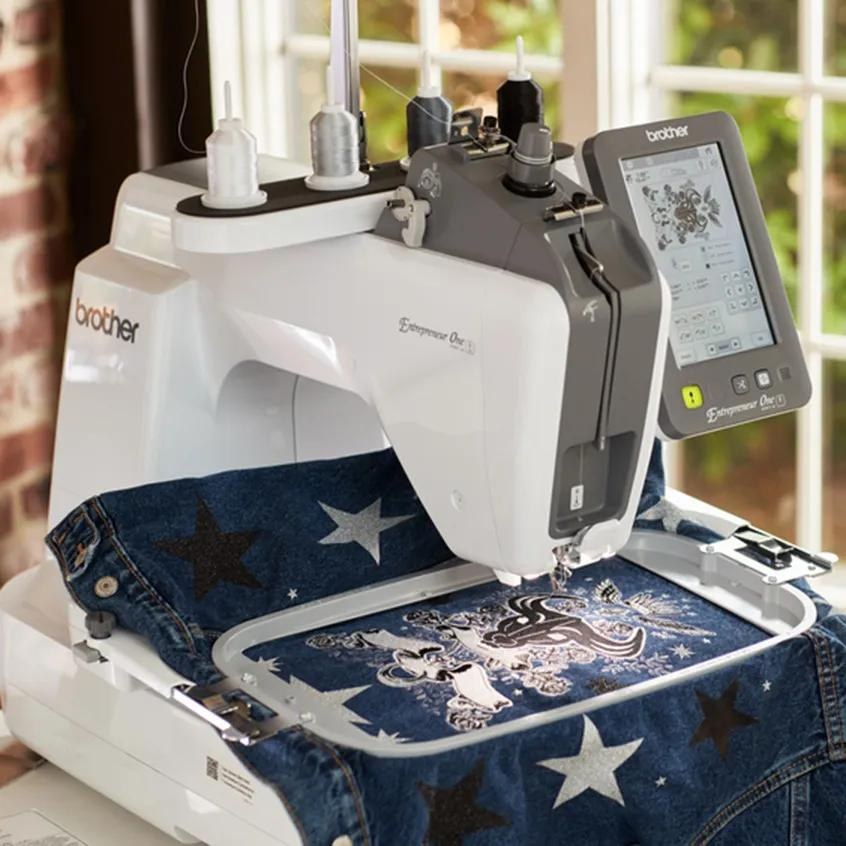
Free arm
The open free arm makes it easier to work on tricky areas such as shirt pockets, sleeves and jeans.
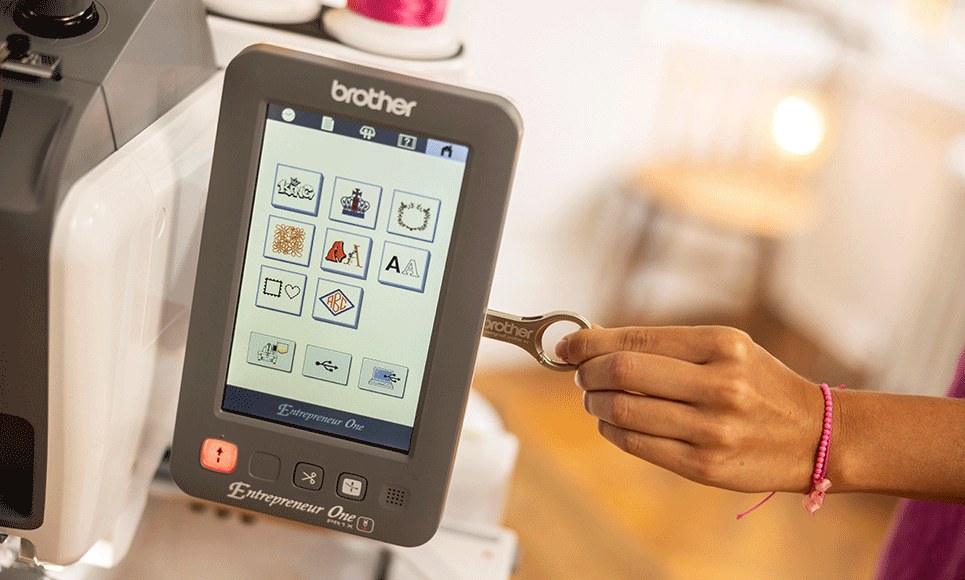
Touchscreen and editing
On the 7-inch colour LCD touchscreen you can select, preview and edit designs: resize, rotate, mirror horizontally and duplicate them. Before embroidering, you can check a preview of the design with the selected hoop on the screen.
Text can be entered on several lines, in size L, M or S, arranged in an arc or on an incline, with adjustable letter spacing and a different colour for each letter. The thread density can be set for some fonts and frame patterns.
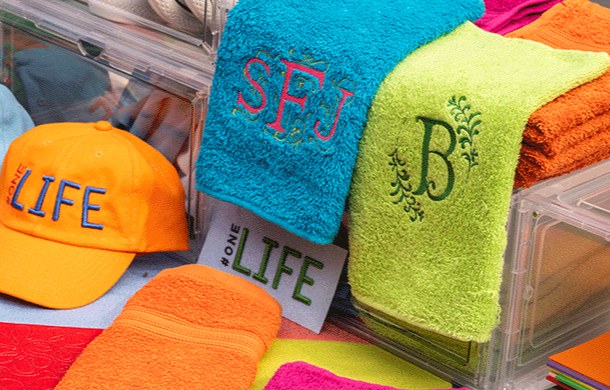
495 designs and 33 fonts
The built-in designs include alphabets, monograms, decorative and graffiti-style designs and appliqués. The 33 fonts include a 3D font and two Cyrillic fonts.
Designs can be combined and repeated, and more designs can be loaded from USB media.
Thread colour sorting and single-colour mode
Before embroidering, you can touch the colour sorting key on the embroidery settings screen: the machine rearranges the embroidery order by thread colour, so fewer thread changes are needed and embroidering is faster. Sorting can be cancelled, but it does not work on overlapping designs.
In single-colour mode the selected design is embroidered in one colour: the machine pauses briefly but does not stop between colour changes. Touching the key again returns to the design's original settings.
More features
Four-spool thread stand
- The stand holds 4 spools of thread, so threads can be changed quickly and easily.
- For thread that winds off quickly, such as metallic thread, use the included spool nets (the thread tension may need adjusting when a spool net is used), and place small spools on the included spool mats.
Bobbin winding while embroidering
- The built-in independent bobbin winder lets you wind a new bobbin while the machine is embroidering.
Changing the bobbin
- If the hook cover can be opened, the bobbin can be replaced without removing the hoop from the machine; if it cannot be opened, or the machine bed is covered by the fabric (for example with a bag-shaped item), the hoop has to be removed temporarily.
Push-button needle threading
- The needle is threaded with a push-button threader.
- When using 65/9 or thinner needles, thread them by hand, because the automatic threader may be damaged.
Automatic thread cutting
- The machine cuts the thread at the end of each colour and trims jump stitch threads within a colour.
- Both functions can be turned off.
- You can set the length of jump stitch that is not trimmed (for example 25 mm); with .dst files, trimming is set by the number of jump codes.
Going back and forward through the stitching
- If the thread breaks or runs out, or you want to start again, you can go back or forward through the stitching on the screen (1 or 10 stitches at a time) or by thread colour, and continue embroidering from the chosen point of the design.
- The hoop moves at the same time.
Thread sensors
- Upper and lower thread sensors alert you when a thread breaks or runs out.
Lower tension
- According to the Brother Europe website, the lower tension mechanism lets you take on a wider range of projects, such as delicate and stretchy fabrics.
USB and computer
- Designs can be transferred with a USB flash drive or the included USB cable (Windows 8.1, Windows 10, Windows 11).
- When connected by cable, the machine appears on the computer as “Removable Disk”; do not create folders in it, because the machine cannot read files stored in a folder.
- There is no wireless connection.
- The machine can embroider split (large-size) designs created with PE-DESIGN version 7 or later.
Custom thread table
- You can create your own thread table of up to 300 colours from nine thread brands.
- The table is saved only to USB media as a .pcp file (not in the machine memory or on a computer).
Basting stitches, appliqué and 3D font
- Before embroidering, basting stitches can be sewn along the outline of the design.
- This is useful when stabiliser cannot be attached to the fabric with an iron or adhesive: by stitching the stabiliser to the fabric, shrinkage of the stitching and misaligned designs are minimised.
- After embroidering, the basting stitches have to be removed.
- Some built-in designs can be used for embroidering appliqués.
- The 3D font is embroidered over urethane foam no thicker than 3 mm, secured with tape.
Resuming after a power failure
- If the machine is switched off unexpectedly while embroidering, for example by a power outage, the rest of the design can be embroidered when it is turned on again; some stitches that were already embroidered may be embroidered again.
Fabric and stabiliser
- The machine can embroider fabric up to 2 mm thick; the needle may break if thicker fabric is embroidered.
- When embroidering thin or stretch fabrics, fabrics with a coarse weave or fabrics that easily allow the stitching to shrink, a stabiliser (backing) must be used.
- The operation manual includes a fabric/stabiliser compatibility chart.
Energy saving
- Eco Mode (10–120 min.) switches off the machine light, the laser and the screen; wake the machine by touching the screen or pressing the “Start/Stop” button.
- Shutoff Support Mode (1–12 h) suspends all functions; to continue, turn the machine off and on again.
- Both modes can be turned off.
Maintenance
- According to the manual, put a drop of oil on the hook before use and, every 40–50 hours of embroidering, one drop on the lower needle bar above the felt washer.
- Use only machine oil and do not over-oil; wipe off any excess with a rag.
- If the thread breaks while embroidering or the hook becomes noisy, oil the race hook.
- Unplug the machine before cleaning.
Hoops and hoop holders
| Hoop / frame | Embroidery area | Holder |
|---|---|---|
| Extra-large hoop PRH300 (included) | 300 × 200 mm | A (included) |
| Medium hoop PRH100 (included) | 100 × 100 mm | A (included) |
| Large hoop (optional) | 180 × 130 mm | A (included) |
| Small hoop (optional) | 60 × 40 mm | A (included) |
| Flat frame (optional) | 300 × 200 mm | A (included) |
| Quilt frame (optional) | 200 × 200 mm | B (included) |
| Border frame (optional) | 300 × 100 mm | B (included) |
| Sleeve frame (optional) | 70 × 200 mm | B (included) |
| Round frames (optional) | diameter 160, 130 or 100 mm | C (optional) |
| Clamp frame S (optional) | 45 × 24 mm | D (optional) |
| Clamp frame M (optional) | 100 × 100 mm | D (optional) |
| Compact frames (optional) | 70 × 41, 50 × 50, 44 × 38 and vertical 33 × 75 mm | E (optional) |
| Magnetic frame (optional) | 50 × 50 mm | E (optional) |
| Versatile magnetic frames (optional) | 180 × 130 and 100 × 100 mm | F (optional) |
| Cap frame (optional) | 130 × 60 mm | not used |
| Flat brim cap frame (optional) | 130 × 60 mm | not used |
| Magnetic sash frame (optional) | 360 × 200 mm (embroidery area 300 × 200 mm) | not used |
| Cylinder frame (optional) | 90 × 80 mm | not used |
Videos
Official videos about this model from Brother SewingCraft Europe. Their titles call the machine PR1.
Technical specifications
| Machine type | Embroidery-only machine: semi-professional, single-needle, for small business use |
|---|---|
| Number of needles | 1 |
| Maximum embroidery area | 300 × 200 mm |
| Maximum embroidery speed | 1000 stitches/min. (depends on the hoop) |
| Speed range | 400–1000 stitches/min. with hoops, 400–600 stitches/min. with cap frames |
| Built-in designs | 495 |
| Lettering fonts | 33 (including a 3D font and two Cyrillic fonts) |
| Frame patterns | 140 (10 shapes × 14 stitch types) |
| Monogram styles | 245 |
| Display | Colour LCD touchscreen, 7 inch |
| Memory | 1024 KB or 20 designs |
| File formats | .pes, .phc, .dst, .pen |
| Connections | USB (USB flash drive – read and write, external USB CD/DVD drive – read only); computer via the included USB cable (Windows 8.1, Windows 10, Windows 11); no wireless connection |
| Needle | Household embroidery needle; HAX 130 EBBR (Organ) is recommended by Brother, and Schmetz 130/705 H-E can be used instead |
| Upper thread | Rayon or polyester machine embroidery thread, 120 den/2, 135 dtex/2, 40 weight (in the Americas and Europe). Some threads may break or have improper tension; in that case change the thread |
| Bobbin thread | Cotton or spun polyester thread, #90 to 120, or 74 dtex/2 to 100 dtex/2 |
| Bobbin | Vertical. Use only prewound bobbins (Fil-Tec / TRU-SEW POLYESTER “Filaments”), the included metal bobbins or bobbins designed specifically for this machine. Included: prewound XH3619-001, metal MBN |
| Needle threading | Automatic, push-button; thread 65/9 and thinner needles by hand |
| Maximum fabric thickness | 2 mm (the needle may break if thicker fabric is embroidered) |
| Thread tension | Manual |
| Thread sensors and cutter | Upper and lower thread sensors; automatic thread cutter |
| Lighting | 3 LEDs |
| Spool stand | For 4 spools |
| Energy saving | Eco Mode 10–120 min. (switches off the machine light, laser and screen); Shutoff Support Mode 1–12 h (suspends all functions); both modes can be turned off |
| Dimensions (W × D × H) | 506 × 587 × 747 mm (per the operation manual; the Brother website lists a height of 565 mm) |
| Free space around the machine | At least 35 cm at the front, at least 5 cm at the rear and at least 15 cm on the left and right sides |
| Weight | 31 kg |
| Setting up and moving | Setting up and moving the machine should be done by two people |
| Operating temperature | 5–40 °C |
| Country of origin | Taiwan |
| Warranty | 3 years (1 year for commercial use, according to Brother) |
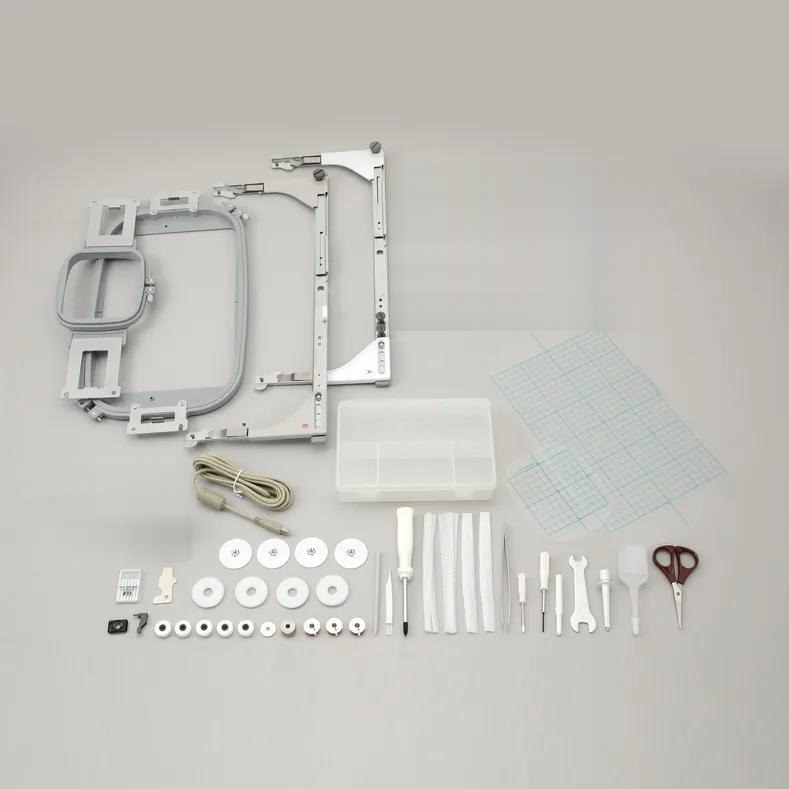
In the box
In the box, according to the official Brother included-accessories sheet.
- Accessory case, XC6482-051
- Needle set, XC6469-001
- Prewound bobbins (5 pcs), XH3619-001
- Metal bobbins (3 pcs), MBN
- Spool nets (4 pcs), D02RAU-001
- Seam ripper, XF4967-001
- Scissors, XF2052-001
- Tweezers, XC6542-051
- Touch pen, XA9940-051
- Needle changing tool (Threader), XF2212-101
- Needle plate cover, XC6499-151 (Brother recommends keeping it, as it may be needed when using optional accessories)
- Phillips screwdriver, XC6543-051
- Standard screwdriver, X55468-051
- Allen screwdriver, XC5159-051
- 3-way screwdriver, XH4670-001
- Wrench, XC6159-051
- Oiler, D01H2N-001
- Cleaning brush, X59476-051
- Weight (L), XC5974-151
- Weight (S), XC6631-051
- Spool mats (4 pcs), XC7134-051
- Thread spool caps (4 pcs), 130012-027
- USB cable, XD1851-051
- Embroidery hoop PRH300 (extra-large), 300 × 200 mm
- Embroidery hoop PRH100 (medium), 100 × 100 mm
- Embroidery sheet (extra-large), 300 × 200 mm, XC5704-051
- Embroidery sheet (medium), 100 × 100 mm, XC5759-051
- Embroidery frame holder A, XF2222-001
- Embroidery frame holder B, XF2223-001
- Operation manual
- Embroidery design guide
- Power cord
- Bobbin case (installed on the machine), XC7206-001
- Threader hook, XC5732-151
Optional accessories (not included in the box)
List compiled from the Brother operation manual and the Brother support page section 'Consumables & Options' for this model.
- Embroidery thread sets ETS12N (12 colours), ETS22N (22 colours) and ETS40N (40 colours) – 100 per cent polyester threads with a satin finish, No. 50
- Country embroidery thread sets CYT21 (21 colours) and CYT40 (40 colours), No. 60
- Embroidery stabilisers: BM3 – iron-on (28 × 100 cm, 3 pcs); BM5 – water soluble (28 × 300 cm, 1 pc); BM6 – water soluble, non-woven fabric (30 × 150 cm, 1 pc)
- Consumables kit PRCNSKIT1 – iron-on stabiliser, water-soluble stabiliser (non-woven fabric), needle set and a prewound bobbin
- Bobbin winder set PRBW1 and metal bobbin 100376-053
- Wide table PR1XWT1 (540 × 772 mm) – a durable surface for large or heavy items such as quilting squares, towels, blankets, jackets and rugs; according to the manual it is required when embroidering with the flat, quilt, border and magnetic sash frames, and recommended for large and heavy garments
- Wide table PRSWT1 / VRWT1 (XG3193-001)
- Embroidery stand PRNSTD2 / VRPRNSTD
- Embroidery frame PRH180 (large, 180 × 130 mm, XG6285-052) – for patterns smaller than 180 × 130 mm; holder A
- Embroidery frame PRH60 (small, 60 × 40 mm, XC6287-052) – for small patterns such as name tags; holder A
- Flat frame (300 × 200 mm, holder A) – for jackets and other thick garments; the wide table is needed when embroidering
- Quilt frame (200 × 200 mm, holder B) – for pieces for quilts; the wide table is needed when embroidering
- Border frame (300 × 100 mm, holder B) – for long strings of characters or patterns; the wide table is needed when embroidering
- Sleeve frame (70 × 200 mm, holder B) – for long items such as shirt sleeves
- Round frames PRPRF100 (XE8427-001), PRPRF130 (XE8430-001) and PRPRF160 (XE8433-001) (diameter 100, 130 and 160 mm); they need holder C – for adding a built-in design to a sleeve; choose the frame to suit the size of the design
- Clamp frame S (45 × 24 mm, holder D) – for specially shaped items that cannot be held in normal frames, such as shoes and gloves
- Clamp frame M (100 × 100 mm, holder D) – for specially shaped items, such as narrow bags
- Compact frames PRSH70 / VRSF70 (70 × 41 mm), PRSH50 / VRSF50 (50 × 50 mm), PRSH44 / VRSF44 (44 × 38 mm) and PRSHV / VRSFV (vertical 33 × 75 mm); holder E – for logos or designs on small items
- Magnetic frame PRMH50 / PRMF50 (50 × 50 mm, holder E) – to prevent the frame from leaving marks in the fabric; free-arm mounting jig PRMHJ1 / PRMFJ1 for the magnetic or compact frame (cylindrical items)
- Versatile magnetic frames (180 × 130 and 100 × 100 mm, holder F) – a variety of fabrics can be secured in the frame easily and firmly
- Magnetic sash frame (360 × 200 mm, embroidery area 300 × 200 mm) – for connected characters or patterns, combined patterns and large patterns; the wide table is needed when embroidering
- Cap frame set PRCF3 (XE2158-001) and the frame alone PRCFH3 (130 × 60 mm, XE2162-001) – for baseball (golf) caps, tulip hats and bucket hats; not suitable for hats with a front area of 50 mm or less (such as sun visors and children's hats), or hats with a brim longer than 80 mm
- Mounting jig PRCFJ2 (XC7611-052)
- Flat brim cap frame set PRCF5 and the frame alone PRCFH5 (130 × 60 mm) – for caps, including flat brim caps and children's caps; allows embroidering closer to the brim than PRCFH3
- Cylinder frame set PRCL1 (XE2166-001) and the frame alone PRCLH1 (90 × 80 mm, XE2170-001) – for tubular and curved items such as shirt sleeves and turtlenecks
- Kits: Apparel PRAPRLKIT1 (sleeve frame, round frame set and tubular frame table), Monogram PRMNGRMKIT1 (clamp frame M set and compact frame set), Sports PRSPRTKIT1 (flat brim cap frame set, flat brim cap frame and clamp frame M set)
Manuals
Any questions?
Call +370 685 85915 or email info@siuvimomanija.lt. We will help you check whether this embroidery machine is right for your work.