
BROTHER Innov-is V3LE
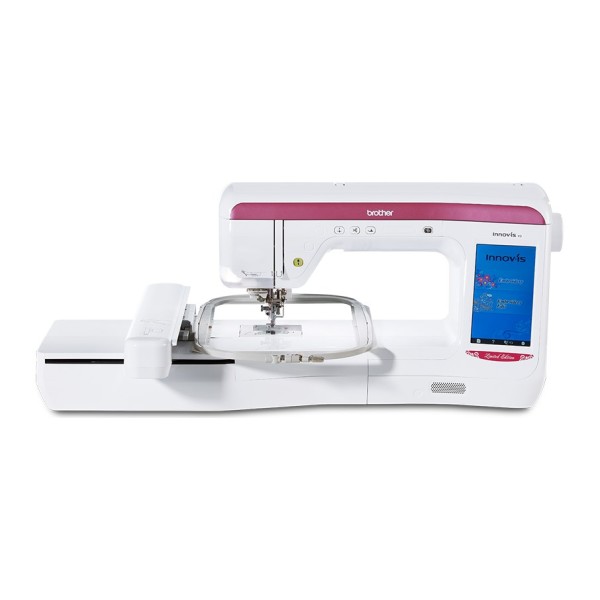

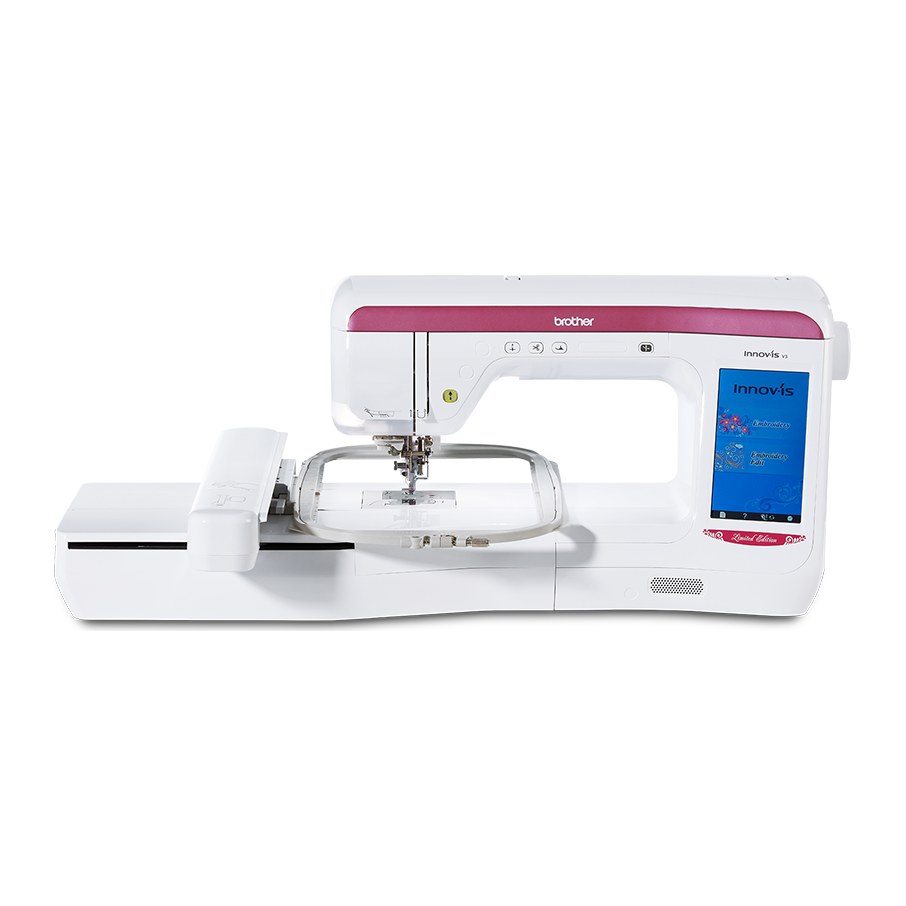
A limited-edition embroidery machine released to mark Brother's 110th anniversary: a 300 × 200 mm embroidery area, 224 built-in designs, a 7-inch colour touchscreen and an LED pointer for the needle drop point.
This is an embroidery-only machine: according to the Brother manual, the home screen offers just two categories, "Embroidery" and "Embroidery Edit". The embroidery unit is removable and must be attached before embroidering.
The embroidery area is 300 × 200 mm, and two hoops are included: 300 × 200 and 200 × 200 mm. The maximum embroidery speed is 1050 stitches per minute. The machine has 224 built-in designs, 17 fonts for lettering and 140 frame patterns.
You edit designs on the screen. You can transfer them to the machine with a USB flash drive or with the included USB cable from a computer. The machine has a needle threader, upper and lower thread sensors, automatic thread cutting and independent bobbin winding: you can wind a new bobbin without stopping the embroidery.
Features
Large embroidery area and two hoops
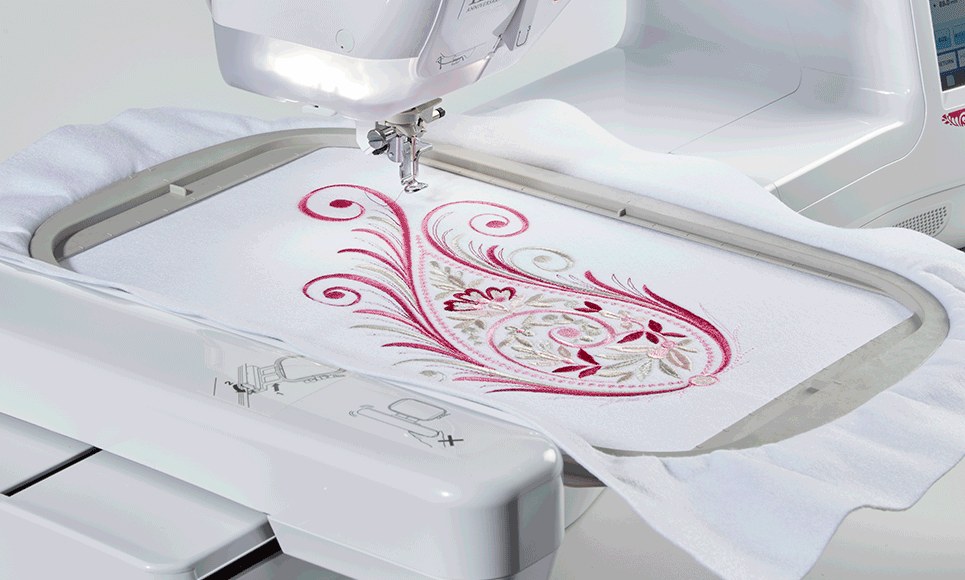
Two hoops are included: 300 × 200 and 200 × 200 mm, and the maximum embroidery area is 300 × 200 mm. A guide mechanism lets you insert and remove the hoops quickly. According to Brother, the large area allows large, complex designs to be embroidered without re-hooping the fabric.
The working area is 28.5 × 12.7 cm (28.5 cm to the right of the needle). According to the addendum to the Brother manual, the screen shows hoop sizes of 30 × 20, 18 × 13, 10 × 10 and 2 × 6 cm. Other included and optional hoops are not shown on the screen, but they can be used.
LED pointer for the needle drop point
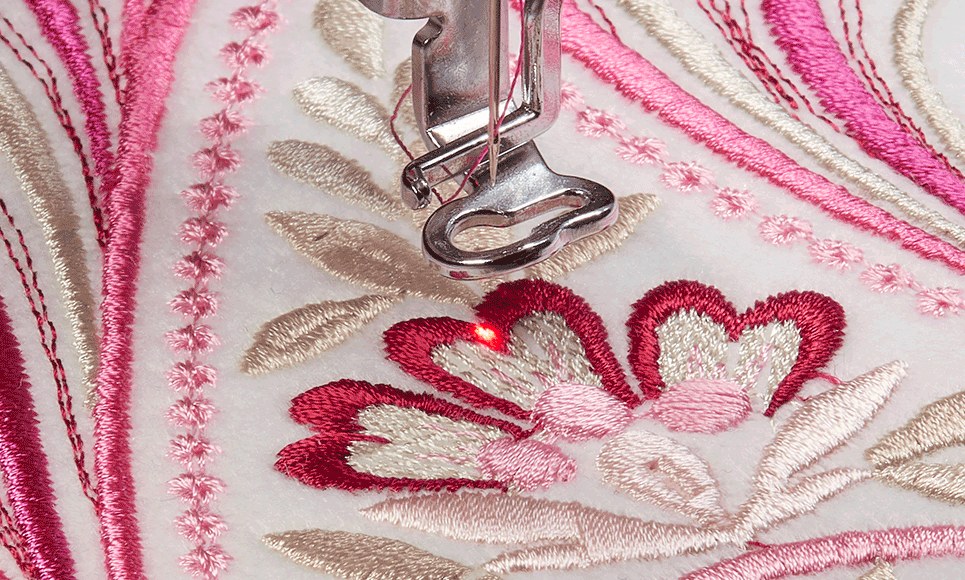
The LED pointer is built into the embroidery foot "W+" and shows where the needle will drop. While the pointer is on, the presser foot height is set automatically according to the fabric thickness. Lowering the presser foot or returning to the previous screen turns the pointer off by itself.
The position and brightness of the pointer can be adjusted in the settings. On bulky fabric the pointer position may be inaccurate, and on a very uneven surface, such as a quilted item, its indication should be used only as a reference.
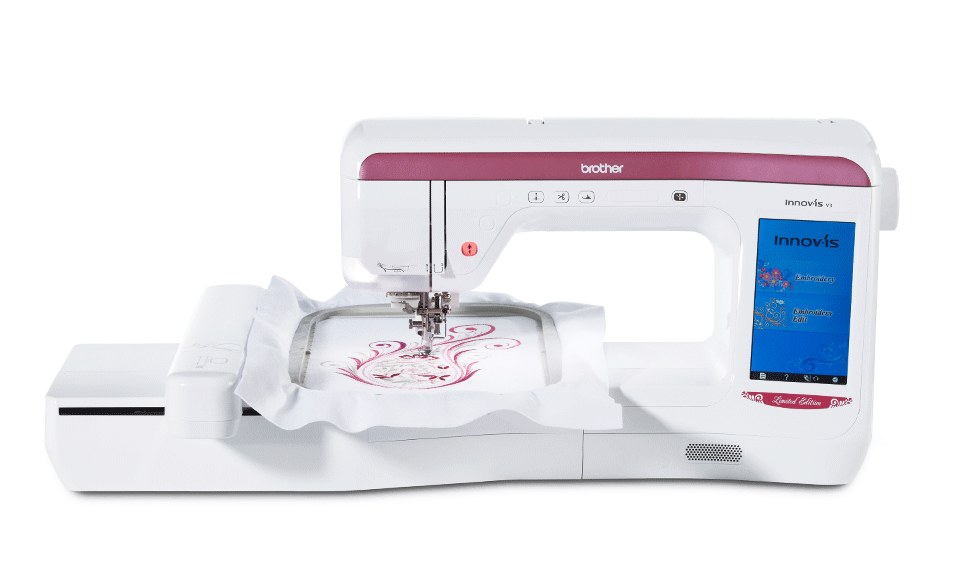
Colour touchscreen and design editing
The screen is a 7-inch LCD touchscreen with 480 × 800 pixels and 260 000 colours. Before you start embroidering, you can see a realistic preview of the design.
You can rotate, enlarge, reduce and mirror designs, and add lettering. The screen has video tutorials and help guides. There are 13 display languages. Touch the screen only with a finger or the included touch pen.
The embroidery screen shows the number of stitches in the design and how many have been sewn, the number of colours and the approximate embroidering time (for each thread colour and for the whole design; the time for changing thread and automatic trimming is not included). You can drag the design with a finger, the touch pen or a connected USB mouse. The screen has a clock that you can set.
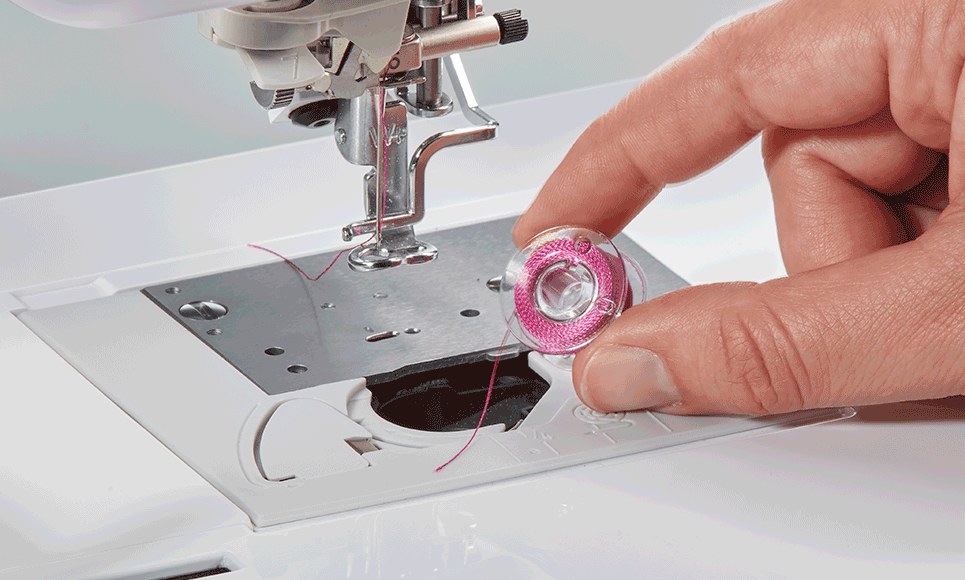
Quick Set drop-in bobbin
Simply drop in a full bobbin and pull the thread through the guide. The bobbin is horizontal, class 15.
Use only the included bobbin or one of the same type (SFB). According to the Brother manual, the machine will not operate correctly with bobbins from other models.
The bobbin case installed in the machine (its screw has no colour mark) is pre-set for 90 wt bobbin thread as supplied, and Brother recommends the included embroidery bobbin thread. The tension can be adjusted with the screw on the bobbin case, as described in the manual.
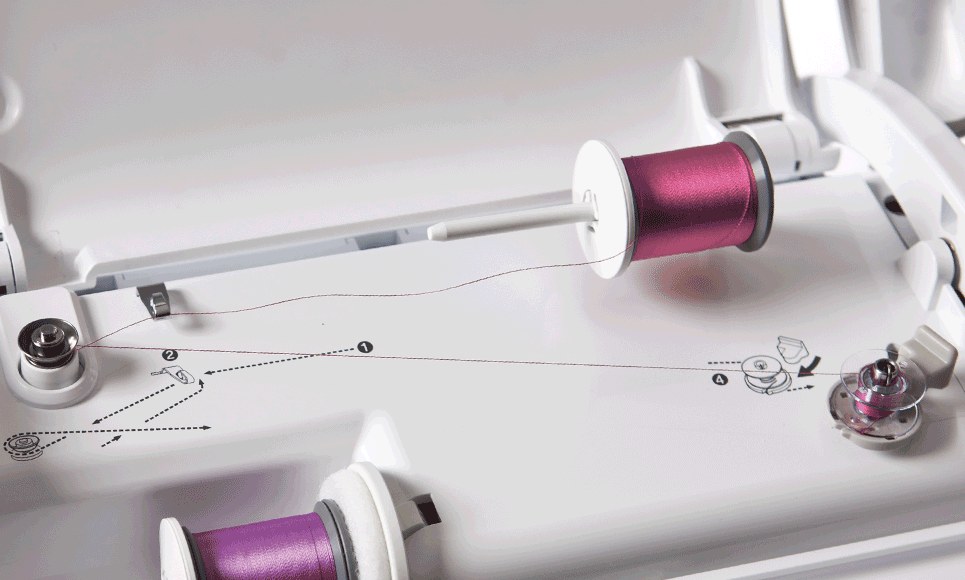
Independent bobbin winding and thread sensors
You can wind a new bobbin without stopping the embroidery and without unthreading the machine. While the main spool pin is in use for embroidering, wind the bobbin using the supplemental spool pin.
Upper and lower thread sensors warn you when a thread has broken or is about to run out. The sensors can be switched off in the settings.
Needle threader, thread tension and trimming
The needle threader works at the touch of a button. It can be used with embroidery machine needles from 75/11 to 90/14. The needle threader cannot be used with transparent nylon monofilament thread or with thread 130/20 or thicker. When using transparent nylon monofilament, metallic or other strong thread, place the included spool net over the spool. When using speciality threads, threading must be done by hand.
The upper thread tension is set automatically and can be changed on the screen. Turning the machine off or selecting a new design returns the tension to automatic. A saved design keeps the tension set for it.
The thread is cut automatically at the end of each colour, and jump stitch trimming is controlled by a separate setting; both functions can be switched off. You can select the length of a jump that is not trimmed from 5 to 50 mm in 5 mm steps: the higher the value, the fewer trims and the more jump stitches remain. With jump stitch trimming on, use the included 75/11 ball point needle for designs with short jumps such as letters: other needles may cause the thread to break.
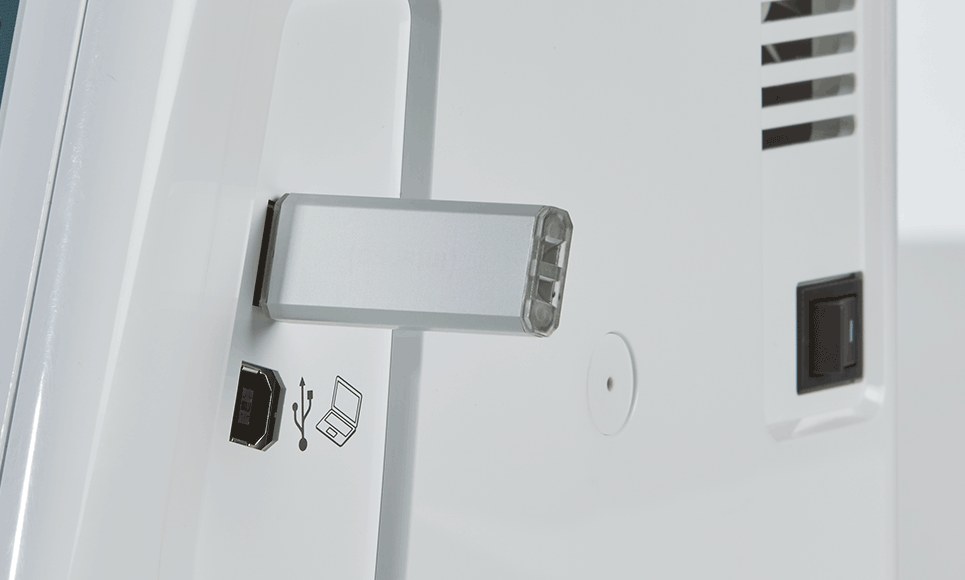
USB and design transfer
You can transfer designs with a USB flash drive or from a computer with the included USB cable. The machine recognises design data even without the embroidery unit.
The machine's memory can store about 1 MB of designs. When the machine is connected to a computer, it appears as "Removable Disk" (about 772 KB). Designs saved on this disk are deleted when the machine is turned off, and folders cannot be created on it. The machine can read folders on USB media.
Only .pes, .phc and .dst files are supported. A combined design can contain up to about 500 000 stitches or 125 colour changes. Some USB media may not be compatible; more information is available on the Brother website.
Embroidery functions
- 224 built-in designs, including Vintage, Trendy, Japanese, Floral and Ignite designs and a large selection of alphabets
- 17 fonts for lettering, including two Cyrillic and three Japanese; sizes L, M and S
- 140 frame patterns (10 shapes × 14 stitch types)
- Multiple-line text input with left, centre or right alignment (L-C-R)
- On-screen editing: combining, moving, rotating, enlarging, reducing and horizontal mirror image; the design can be displayed on the screen magnified by 200 %
- Character editing: increasing and decreasing the spacing, 6 layouts (for example a curved or diagonal line), separating combined characters
- Long text in sections: a single-line text that does not fit in the hoop is embroidered in several parts (linked characters)
- Thread colour change, a custom thread table (saved to and recalled from USB media), uninterrupted single-colour embroidery
- Repeated patterns (design copies); density change for lettering and frame patterns
- Appliqué: some designs include an appliqué, and the colour order display shows the steps "APPLIQUE MATERIAL", "APPLIQUE POSITION" and "APPLIQUE"; an appliqué can also be made with frame patterns (one sewn with a straight stitch and one with a satin stitch)
- Split patterns (created with PE-DESIGN Ver.7 or later or PE-DESIGN NEXT; the software is not included)
- Basting along the design outline: for fabric that cannot take iron-on or adhesive stabiliser; stitching the stabiliser to the fabric minimises shrinkage and misalignment; the distance can be adjusted; remove the basting stitches afterwards
- Bobbin work: medium to heavy thread or ribbon is wound on the bobbin and stitched from the underside, with the fabric wrong side up; the machine has bobbin work patterns; the grey bobbin case is used
- Bobbin work threads: lower thread No. 5 or finer hand embroidery or decorative thread, or flexible woven ribbon (about 2 mm); thread heavier than No. 5 must not be used; upper thread polyester embroidery thread or transparent nylon monofilament; for an invisible look, monofilament or light polyester thread (50 wt or above) in the colour of the lower thread; speed 100, 200 or 350 stitches per minute
- Resuming after power-off: the current colour and stitch number are saved and you can continue or delete the design; do not remove the embroidery unit, or the machine will forget the design
- Thread break or empty bobbin: the machine stops; the needle can be moved back (or forward) by a chosen number of stitches to the break point, or to the start of the colour, and you continue from there; if very little sewing remains you can embroider the last 10 stitches without rethreading; the design can also be restarted from the beginning
- Fabric preparation: according to the Brother manual, always use embroidery stabiliser; for stretch, lightweight or coarse-weave fabrics, and fabrics in which the design shrinks, a stabiliser is required, otherwise the needle may break; for thin fabrics (e.g. organdy, lawn) and napped fabrics (e.g. towelling, corduroy) Brother recommends water-soluble stabiliser (sold separately); on thick terry towels place a piece of water-soluble stabiliser on top of the towel
- Embroidery foot height: for thick or puffy fabrics (for example layers with thicker batting) the presser foot height can be adjusted in the embroidery settings screen; the 1.5 mm setting is used for most embroidery
- Hoop and space around it: choose the hoop to match the size of the design, because a hoop that is too small can be struck by the presser foot. When embroidering large garments such as jackets, the fabric must not hang over the table: the embroidery unit cannot then move freely, and the hoop may strike the needle and bend or break it. Nothing may stand in the hoop's range of motion, because the hoop may strike it and the design will be poorly embroidered
- Embroidery needle plate cover: if the upper thread forms loops because of the fabric, stabiliser or thread, attach the included cover to the needle plate; it must be pushed in as far as it will go, because a cover that is not securely attached may cause the needle to break
- Design placement check: before embroidering you can pick a position on the design and the hoop moves to show where it will be sewn; the whole embroidery area can also be shown; embroidering can be started from the preview screen with the "Start/Stop" button
- Copyright: according to the Brother manual, the stored designs are for private use only; public or commercial use of copyrighted designs is prohibited
More features
- Central controls: presser foot lifter button, trimmer button (cuts the upper and lower threads), needle position button (up and down)
- Embroidery speed levels: 350, 600 and 1050 stitches per minute; the speed can be changed during embroidering; reduce the speed for thin, thick or heavy fabrics; use 600 stitches per minute for metallic or speciality thread; the setting is kept after the machine is turned off
- Full-spectrum LED lighting (6 LEDs), adjustable on the screen
- Built-in thread charts of several manufacturers: you choose a brand on the screen and the matching colour is displayed
- "Eco Mode" (sleep mode after a set time, 0–120 min or OFF; touch the screen or press "Start/Stop" to continue) and "Shutoff Support Mode" (lower power consumption after a set time, 1–12 h or OFF; turn the machine off and on to restart)
- The machine's software can be upgraded with USB media or from a computer; upgrade files (when available) are published on the Brother support website support.brother.com
- Maintenance – the user must not oil the machine: it was lubricated at the factory with the right amount of oil, so periodic oiling is not needed. Unplug the machine before cleaning; clean the bobbin case area with the brush and do not oil it.
Videos
These videos were published by another author (Happylab), not by Brother.
Technical specifications
| Machine type | Embroidery-only machine; the embroidery unit is removable |
|---|---|
| Skill level | For experienced users (Brother level "Expert") |
| Embroidery area | 300 × 200 mm |
| Workspace | 28.5 × 12.7 cm (28.5 cm to the right of the needle) |
| Hoops included | 2: 300 × 200 and 200 × 200 mm |
| Maximum embroidery speed | 1050 stitches per minute (350, 600 or 1050 can be selected) |
| Built-in designs | 224 |
| Embroidery fonts | 17 (two Cyrillic, three Japanese; sizes L, M and S) |
| Text input | Multiple lines; L-C-R alignment (left, centre, right) |
| Built-in frame patterns | 140 (10 shapes × 14 stitch types) |
| Design memory | About 1 MB |
| Design file formats | .pes, .phc, .dst; data saved with systems or machines other than Brother ones may cause the machine to malfunction |
| Design size limits (.pes files) | A combined design can contain up to about 500 000 stitches or 125 colour changes; the figures are approximate |
| .dst files | Shown in the design list by file name; the actual image is not displayed; only the first 8 characters of the name are shown; there is no thread colour information, so the default colour sequence is used |
| File names | Files and folders with special characters may not be displayed; Brother recommends the 26 letters of the alphabet (upper and lower case), the digits 0–9, "-" and "_" |
| Embroidery unit | Removable; design data is recognised even without the unit |
| LED pointer | Foot "W+"; position and brightness are adjustable in the settings |
| Display | 7-inch LCD touchscreen, 480 × 800 pixels, 260 000 colours |
| Display languages | 13 |
| Connectivity | USB 2.0 port for a mouse and USB media; a separate USB port for a computer |
| USB media | USB flash drive; memory cards through a separate USB card reader or writer (not included): SD, CompactFlash, Memory Stick, Smart Media, MMC, xD-Picture; some USB media may not be compatible, information is on the Brother website |
| Transfer from a computer | With the included USB cable; the machine appears as "Removable Disk" (about 772 KB); designs saved on this disk are deleted when the machine is turned off; folders cannot be created |
| Computer requirements | Operating systems listed in the Brother manual (2020): Windows XP, Vista, 7 and 8 |
| Design software | PE-DESIGN is offered as optional software (according to the Brother leaflet); it is not included |
| Number of needles | 1 |
| Needles for embroidery | Use only embroidery machine needles made for home use; 75/11 for embroidery; for heavy fabrics and stabilisers such as denim or "puffy foam", 90/14 is recommended because a 75/11 needle may bend or break |
| Needles in the box | 3 × 75/11, 1 × 90/14 and 2 × 75/11 ball point (HAX130EBBR) |
| Needle threader | Automatic; for needles 75/11–90/14; cannot be used with transparent nylon monofilament thread or thread 130/20 or thicker |
| Upper thread | Embroidery thread intended for this machine is recommended; other threads may not give optimal results; spool net for monofilament, metallic or other strong thread; speciality threads are threaded by hand |
| Lower (bobbin) thread | Embroidery bobbin thread intended for this machine; the bobbin case is pre-set for 90 wt thread as supplied; the box includes Brother #90 bobbin thread (EBT-PEN) |
| Bobbin | Horizontal, class 15, height 11.5 mm (SFB) |
| Bobbin insertion | Quick Set (drop-in bobbin) |
| Bobbin winder | Independent: you can wind without stopping the embroidery |
| Thread sensors | Upper and lower thread; can be switched off in the settings |
| Thread tension | Automatic; can be changed on the screen |
| Thread cutting | Automatic at the end of a colour; the button cuts the upper and lower threads |
| Jump stitch trimming | Can be switched on and off; the length of a jump that is not trimmed can be selected from 5 to 50 mm in 5 mm steps |
| Lighting | Full-spectrum LED, 6 LEDs, adjustable on the screen |
| Spool pins | 2 (main and supplemental) |
| Fabric thickness | Less than 3 mm; thicker fabric may break the needle |
| Power consumption | 67 W |
| Dimensions without the embroidery unit (W × D × H) | 57.1 × 28.4 × 33.2 cm |
| Weight without the embroidery unit | 13.9 kg |
| Embroidery unit dimensions (W × D × H) | 54.5 × 46.4 × 13.0 cm |
| Embroidery unit weight | 3.9 kg |
| Dimensions with the embroidery unit attached (W × D × H) | 81.5 × 46.4 × 33.2 cm |
| Country of origin | Taiwan |
| Intended use | Household use (according to the Brother manual) |
| Warranty | 3 years (1 year for commercial use, according to Brother) |
In the box
These items may vary by country or region: the embroidery foot W+ with LED pointer, the vertical spool pin, the bobbin clips, the grey bobbin case, the 20 × 20 cm hoop and the stabiliser. In the box, according to the official Brother included-accessories sheet.
- Embroidery foot W+ with LED pointer FLED1 (on the machine)
- Needle set: 3 × 75/11 and 1 × 90/14
- Ball point embroidery needle set: 2 × 75/11 (HAX130EBBR)
- Bobbins, 10 pcs (one in the machine; SFB)
- Seam ripper
- Scissors
- Cleaning brush
- Screwdriver (large)
- Screwdriver (small)
- Disc-shaped screwdriver
- Vertical spool pin
- Thread spool cap (small)
- Thread spool cap (medium), 2 pcs (one is on the machine)
- Thread spool cap (large)
- Thread spool cap (special)
- Bobbin clips, 10 pcs
- Spool felt (on the machine)
- Spool nets, 2 pcs
- Embroidery needle plate cover
- Touch pen (stylus)
- USB cable
- Bobbin case (grey, for bobbin work)
- Bobbin cover (on the machine)
- Embroidery hoop EF91 (quilt), 20 × 20 cm
- Embroidery hoop EF92 (extra large), 30 × 20 cm
- Brother #90 bobbin thread (EBT-PEN)
- Stabiliser (BM3)
- Dust cover
- Accessory bag
- Operation manual
- Quick reference guide
Optional accessories (not included in the box)
List compiled from the Brother operation manual and the Brother support page section 'Consumables & Options' for this model.
- Extra-large embroidery hoop EF81 (26 × 16 cm; for larger embroidery projects)
- Multi-purpose screwdrivers MDRIVER1, MDRIVER2
- Bobbins and bobbin clips (BCL)
- “Border Frame” hoop for continuous border designs BF2 (10 × 18 cm; there is no need to remove and re-hoop the fabric: the clip system opens the frame, you reposition the fabric and continue embroidering)
- “Border Frame” hoop for continuous border designs BF3 (10 × 30 cm; there is no need to remove and re-hoop the fabric: the clip system opens the frame, you reposition the fabric and continue embroidering)
- Water-soluble embroidery stabiliser BM5 (for lace embroidery and fabrics with a nap, such as towels or fur)
- Non-woven water-soluble embroidery stabiliser BM6 (for lace embroidery and fabrics with a nap, such as towels)
- Country embroidery thread sets CYT21, CYT40 (matt finish; 21 and 40 colours)
- Small embroidery hoop EF73 (2 × 6 cm; for smaller items such as baby clothes, cuffs, pockets and more)
- Embroidery hoop EF74 (10 × 10 cm; for smaller projects)
- Larger embroidery hoop EF75 (13 × 18 cm; for a variety of applications)
- Large embroidery hoop EF76 (30 × 18 cm; for larger projects)
- Brother embroidery thread sets ETS12N, ETS22N, ETS40N (12, 22 and 40 colours; 100 % polyester)
- Pre-wound embroidery bobbins PWB90
- Square embroidery hoop SEF150 (15 × 15 cm; for quilt blocks and clothing)
- Ten-spool thread stand TS1
- Ten-spool thread stand TS5 (you set up 10 threads at once, which makes changing colours easy)
- Magnetic frame MF180 (180 × 130 mm; you hoop fabric up to 2 mm thick without catches and levers)
- Magnetic frame MF300 (300 × 180 mm; you place fabric up to 2 mm thick on the hoop and add the magnets, no levers, catches or screws are needed)
- Protective sheet PS2
Manuals
Any questions?
Call +370 685 85915 or email info@siuvimomanija.lt. We will help you check whether this embroidery machine is right for your work.